Outpost
Application intelligence that tells you what to fix first.
Error tracking tells you something broke. Outpost tells you which deploy broke it, how many visitors it hurt, what the original line of code was, and whether your site is still up — on one screen, without storing a single IP address.
- ROLE
- Solo · Product design · Frontend · API · Database · SDK · Security
- PRODUCT TYPE
- Error, performance, uptime and security monitoring (a Sentry alternative)
- STACK
- Next.js 16 · React 19 · TypeScript · Supabase Postgres · Tailwind CSS v4 · Turborepo
- AI
- Claude (Anthropic API) for root cause analysis over correlated evidence
- STATUS
- Working foundation. This portfolio reports its errors, vitals and page views into it.
AT A GLANCE
398
Automated tests
341 for the app and API, 57 for the browser SDK
56
Row-level security policies
Across 33 tables. Membership is the only access boundary
20
Schema migrations
Every table, function and grant is versioned SQL
43
Source maps per build
Uploaded, then deleted, by this site’s own production build
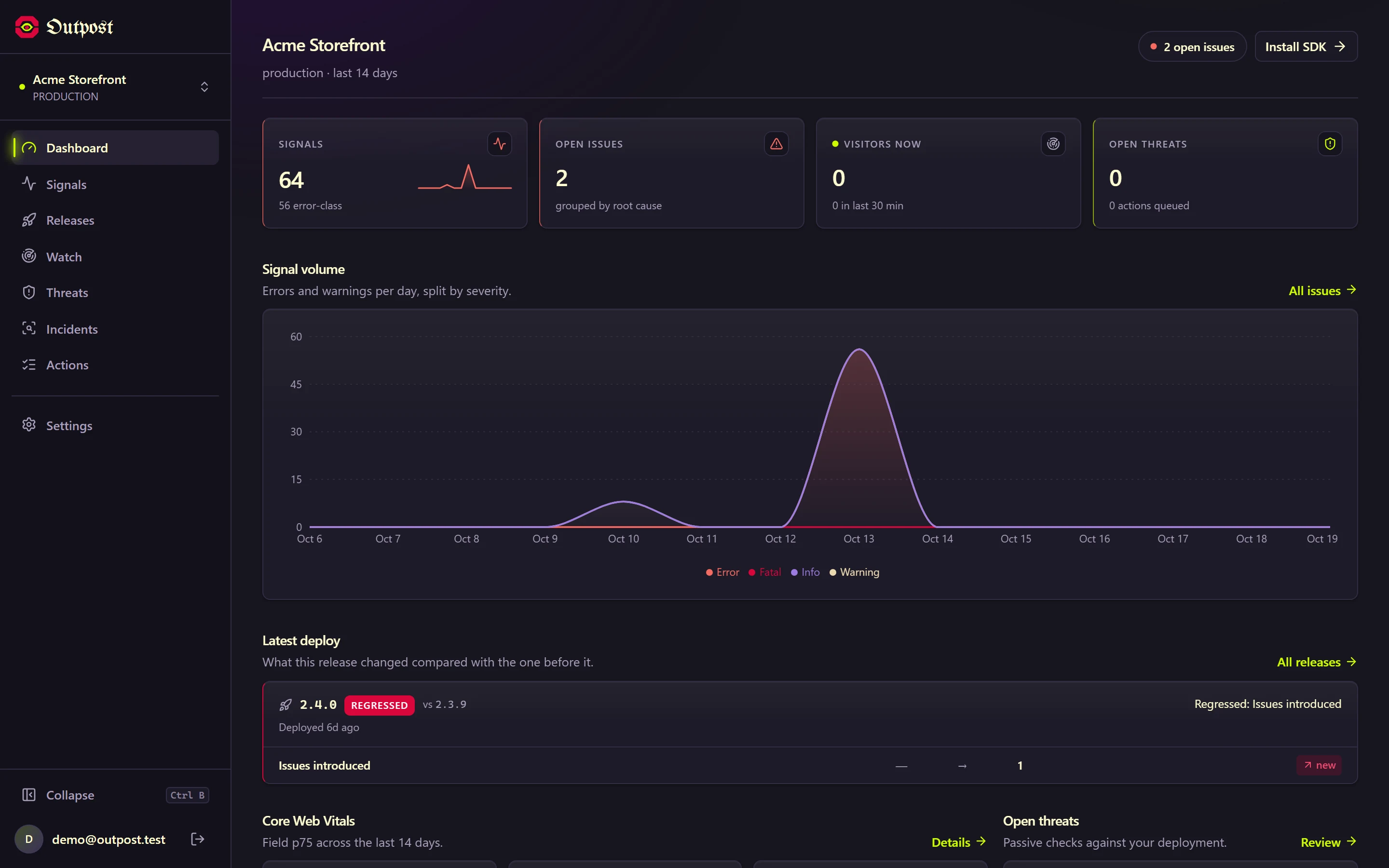
The dashboard: errors, visitors, vitals, threats and the latest deploy on one screen
Monitoring tools answer “what broke”. Teams need “what do I fix first”.
Sentry is the default for a reason, but its answers are spread across separate products: errors in one place, performance in another, uptime as an add-on, and no security posture at all. Its issue list sorts by event count, so one visitor stuck in a render loop outranks a checkout crash hitting forty people. And the first question in every incident — which deploy did this? — takes three tabs to answer.
Noise ranks above harm
Sorting by occurrences rewards whatever logs the most, not whatever hurts the most people.
Deploys are disconnected
Errors, Web Vitals and releases live in different views, so “this deploy made LCP 40% worse” is something you assemble by hand.
Minified stacks are unreadable
Without source maps a production stack is `t (chunk.js:1:127)`. Uploading maps safely is fiddly enough that many teams skip it.
One screen for everything a small team needs to know about production.
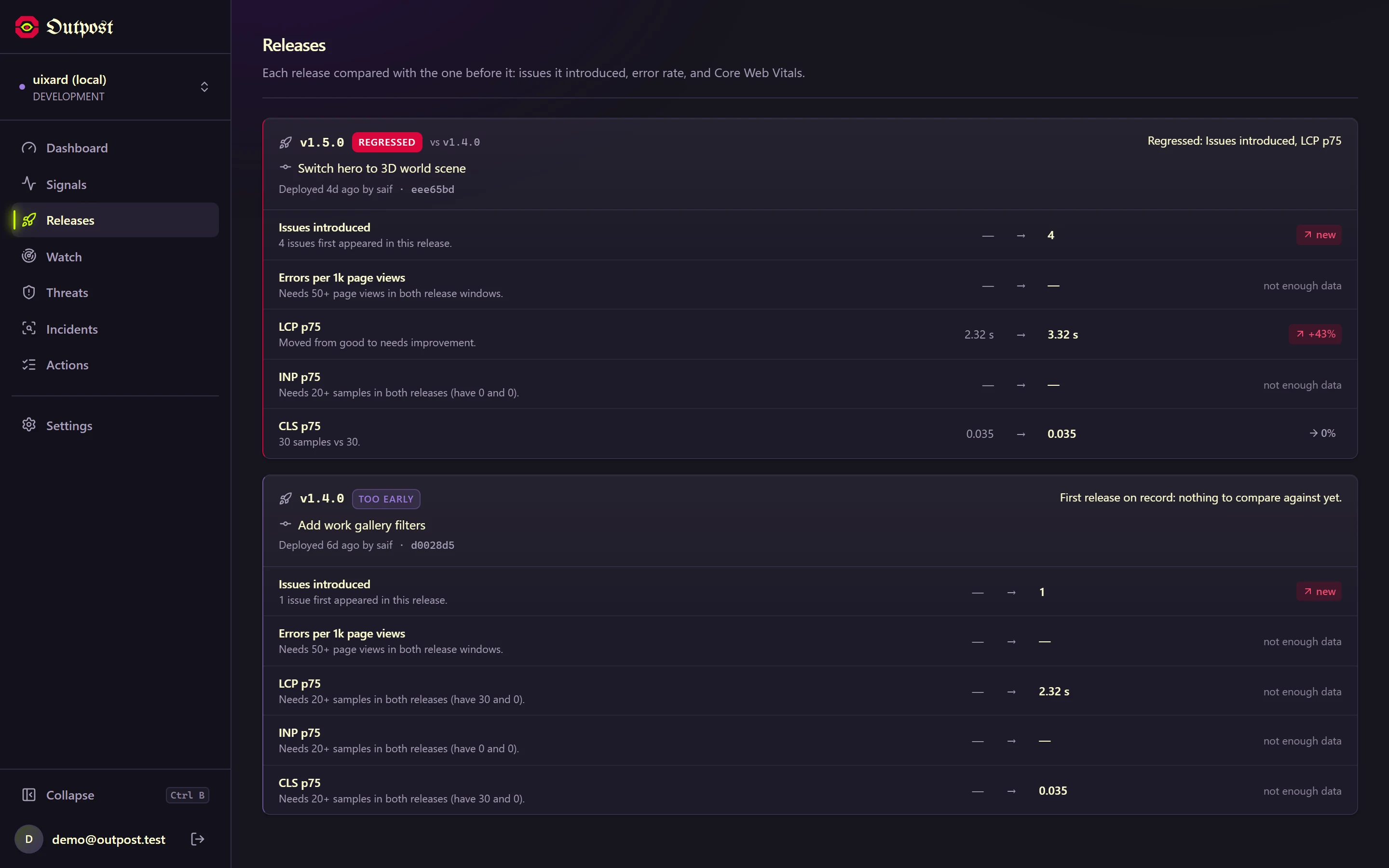
Every release, compared with the one before
- Issues the release introduced, not just issues seen after it
- p75 LCP, INP and CLS per release, from raw samples
- Flags a vital crossing a rating band, even under 10%
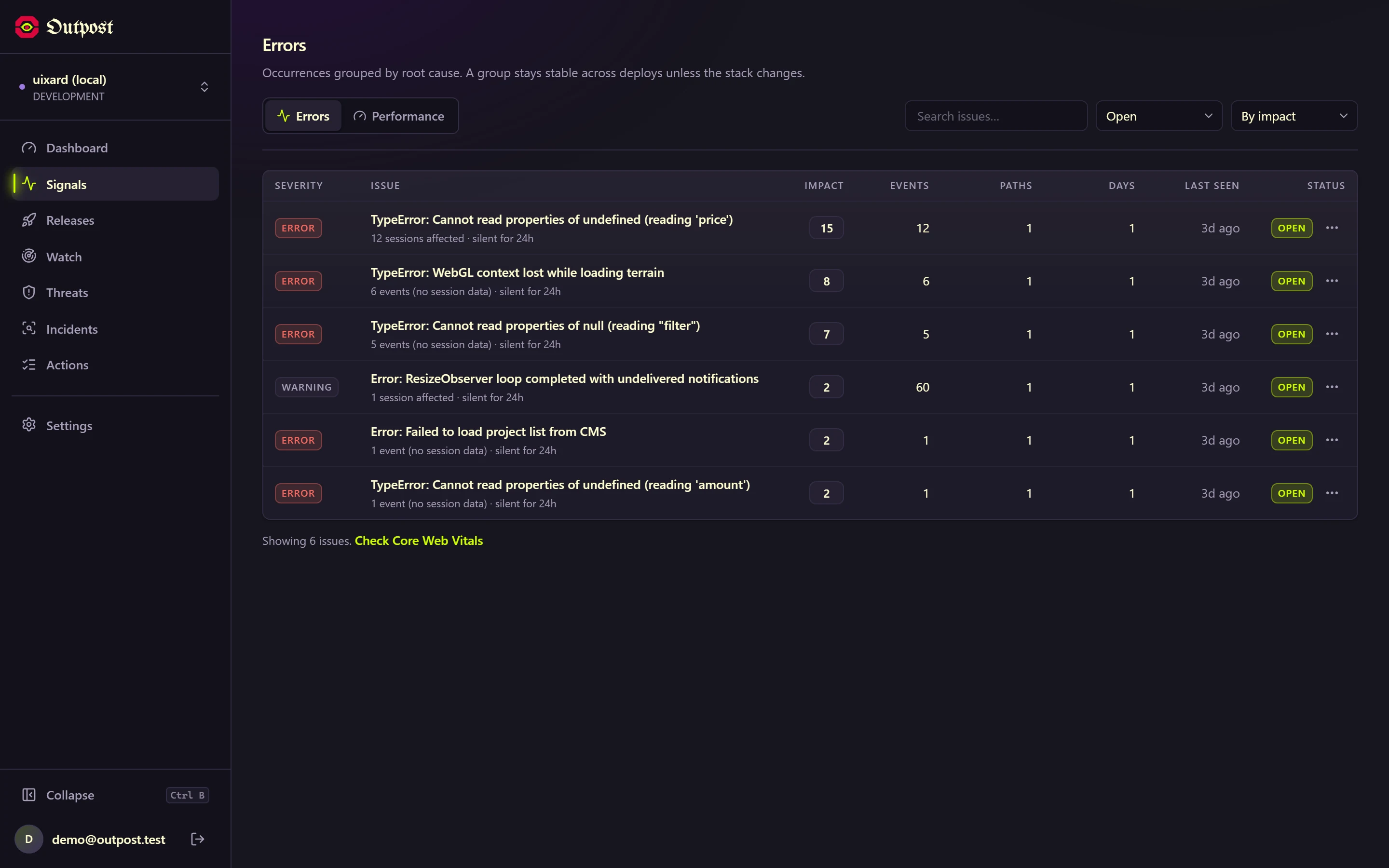
Ranked by people affected
- Distinct visitor sessions, severity, breadth and trend
- Every score shows its reasons in words
- Falls back honestly when session data is missing
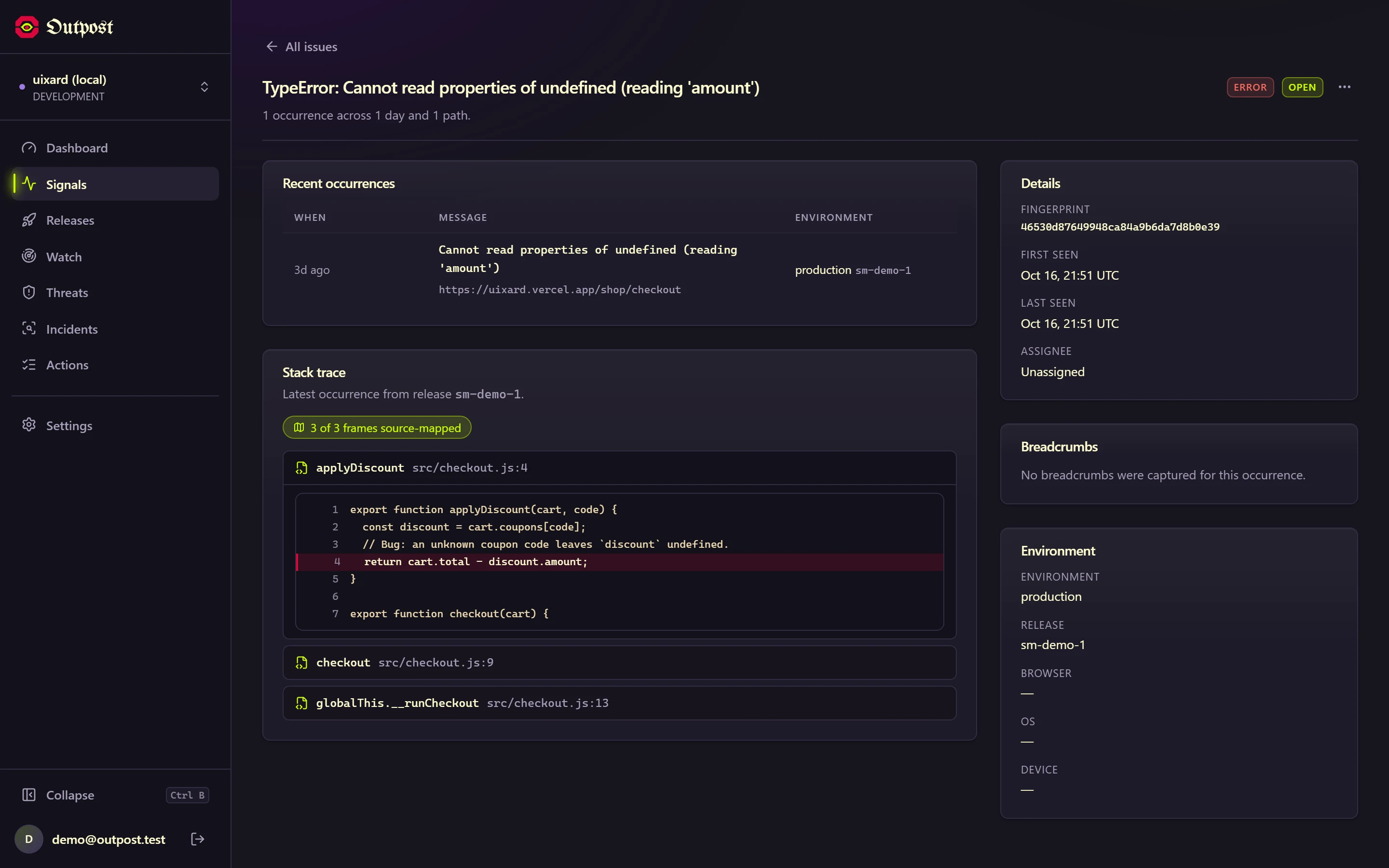
Original code in every stack
- One line in next.config uploads maps at build time
- Maps are deleted before deploy, so source is never public
- Failing line highlighted with surrounding code
Claude reads the evidence, not a guess
- Built on a deterministic correlation engine
- Cites evidence keys and file:line for each cause
- Suggests a patch, never applies one
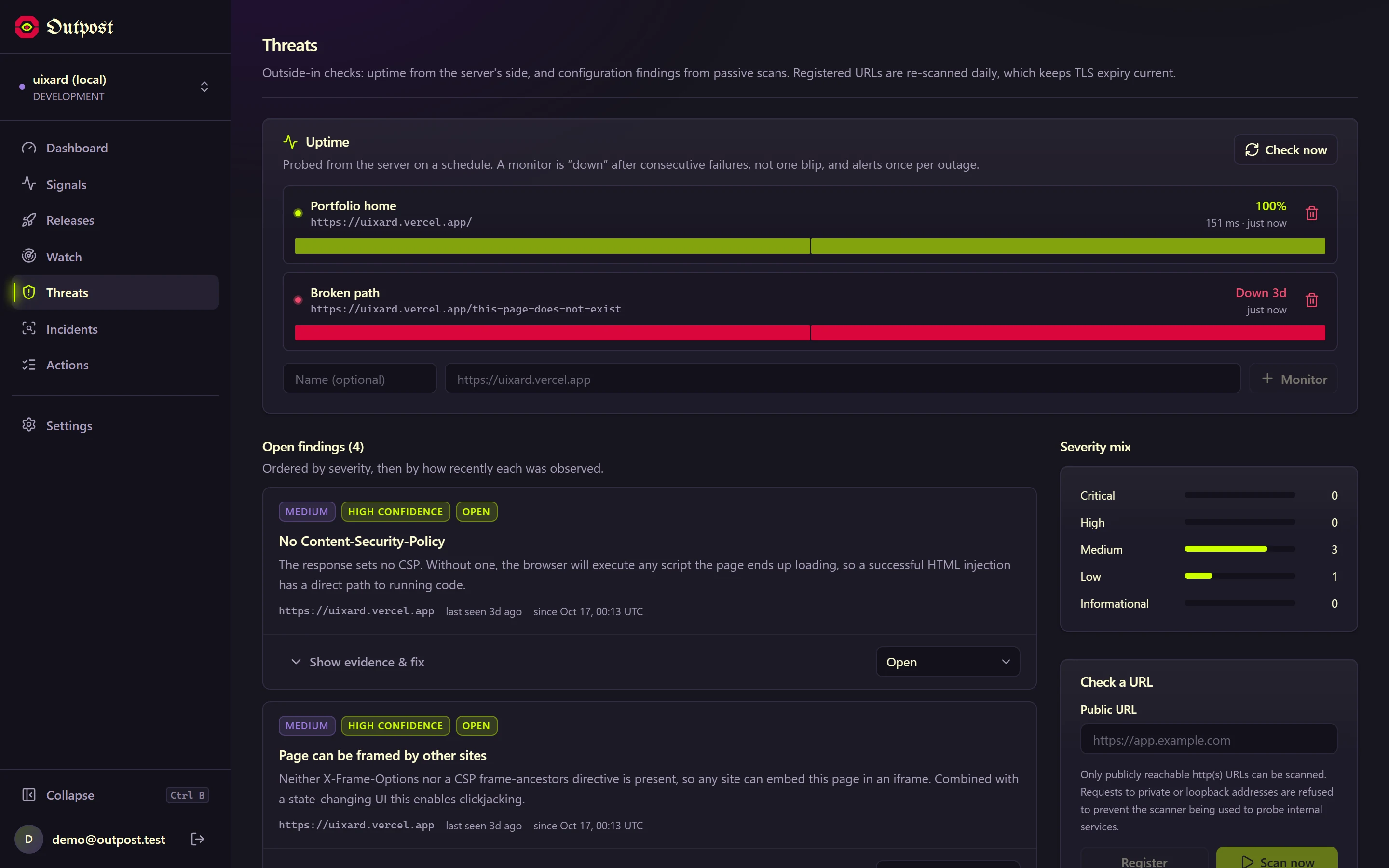
Uptime, TLS and headers
- Confirmed-down after consecutive failures, one alert per outage
- Daily passive re-scans keep TLS expiry current
- Every outbound request is DNS-pinned against SSRF
No IPs, no cookies, no replay
- Sessions are random per page load
- PII redacted in the SDK before anything is sent
- Live visitor counts without tracking people
IN THE PRODUCT
PROBLEM
Source map uploads were designed to use the project's ingestion key. That key ships in browser JavaScript.
OPTIONS
Accept it (simple, matches the original design) or add a second credential (more setup).
DECISION
Scoped keys: a public opk_ key for events and a secret opu_ key, kept in CI, for uploads and deploys. The API names the mistake when the wrong one is used.
RESULT
Nobody can overwrite a project's maps and make every stack point at the wrong line.
PROBLEM
A release with no predecessor “introduced” every issue, so the first deploy on record always read as a regression.
OPTIONS
Hide the first release, or show it with a red verdict.
DECISION
A fourth verdict, “Too early”, with the reason in words. Comparisons below a sample floor say “not enough data” rather than “no change”.
RESULT
The page never claims a regression or a no-change it cannot back with data.
PROBLEM
Live testing showed every uptime probe failing with “Invalid IP address: undefined”, against a site that was up.
OPTIONS
Disable DNS pinning (fast, but reopens SSRF via DNS rebinding) or find the cause.
DECISION
Traced it to Node 20+ Happy Eyeballs calling lookup with { all: true } and expecting an array. One shared lookup now answers both shapes from the pinned address.
RESULT
Uptime and the existing security scanner both work again, with the SSRF protection intact and a regression test.
PROBLEM
Source map names map the identifier at a call site, which is the function being called, not the one calling.
OPTIONS
Show the map's name as-is (what most tools do) or the minified name.
DECISION
Name each frame from its caller's call site, falling back to the runtime's own name.
RESULT
Frames read applyDiscount → checkout → __runCheckout instead of being one off. Pinned by a test on real bundler output.
Postgres does the security. The app decides only what to render.
Every dashboard read goes through the signed-in user's own database session, so Row Level Security decides visibility. Writes from the outside world (events, maps, deploys) go through narrow, key-checked API routes.
BROWSER SDK
@outpost/sdk
Zero dependencies. Errors, Web Vitals (real INP), page views, batching, sendBeacon on exit, PII redaction.
NEXT.JS INTEGRATION
@outpost/sdk/next
withOutpost() for build-time maps and deploys; onRequestError for server, route, action and proxy errors.
INGESTION
Next.js route handlers
Zod validation stricter than the schema, shared Postgres rate limiting, idempotent writes, origin allowlist.
DATA
Supabase Postgres
33 tables, 56 RLS policies, SECURITY DEFINER functions with pinned search_path, pgTAP tests.
INTELLIGENCE
Rule engine + Claude
Deterministic correlation of deploys, issues, vitals, traces and logs; AI analysis on request, cached by input digest.
OUTSIDE-IN
Pinned HTTP client
Resolve once, validate, pin the address. Uptime probes and passive security scans share it.
This portfolio is Outpost's first user.
The setup a Next.js app needs is three small changes, and this site uses exactly these.
- 01
Wrap the config
withOutpost(nextConfig) exposes the release to the browser and, when an upload key is present, uploads source maps after compilation, deletes them, and records the deploy.
- 02
Export the server hook
export { onRequestError } from "@outpost/sdk/next" in instrumentation.ts reports server errors with route context, never request headers.
- 03
Mount the browser monitor
A small client component starts the SDK once and records client-side navigations as page views.
What it deliberately does not do.
The product says these things in its own UI, not just here.
No session replay
A deliberate privacy decision, not a missing feature.
A clean scan is not “secure”
Passive checks found nothing. The product keeps saying exactly that.
AI suggests, never acts
No automatic patches or pull requests: recommending is the boundary.